
MORI NEWSLETTER

From new products to real-world applications and trade show news.
Give buyers a reason to take another look and get in touch —
share your news consistently with a newsletter.
See a newsletter exampleWhy send a newsletter?
How a newsletter keeps your company known and builds trust
MORI feature guide · 5 min read
01

BE KNOWN. BUILD TRUST.

Why send a newsletter?

In global sales, awareness and trust lay the groundwork for the next conversation. Keep sharing well-organized updates so that overseas buyers you have just connected with can recall and refer to your company and products when they evaluate a purchase.

02

A REAL SAVED TEMPLATE

How CONNECT AI uses it.

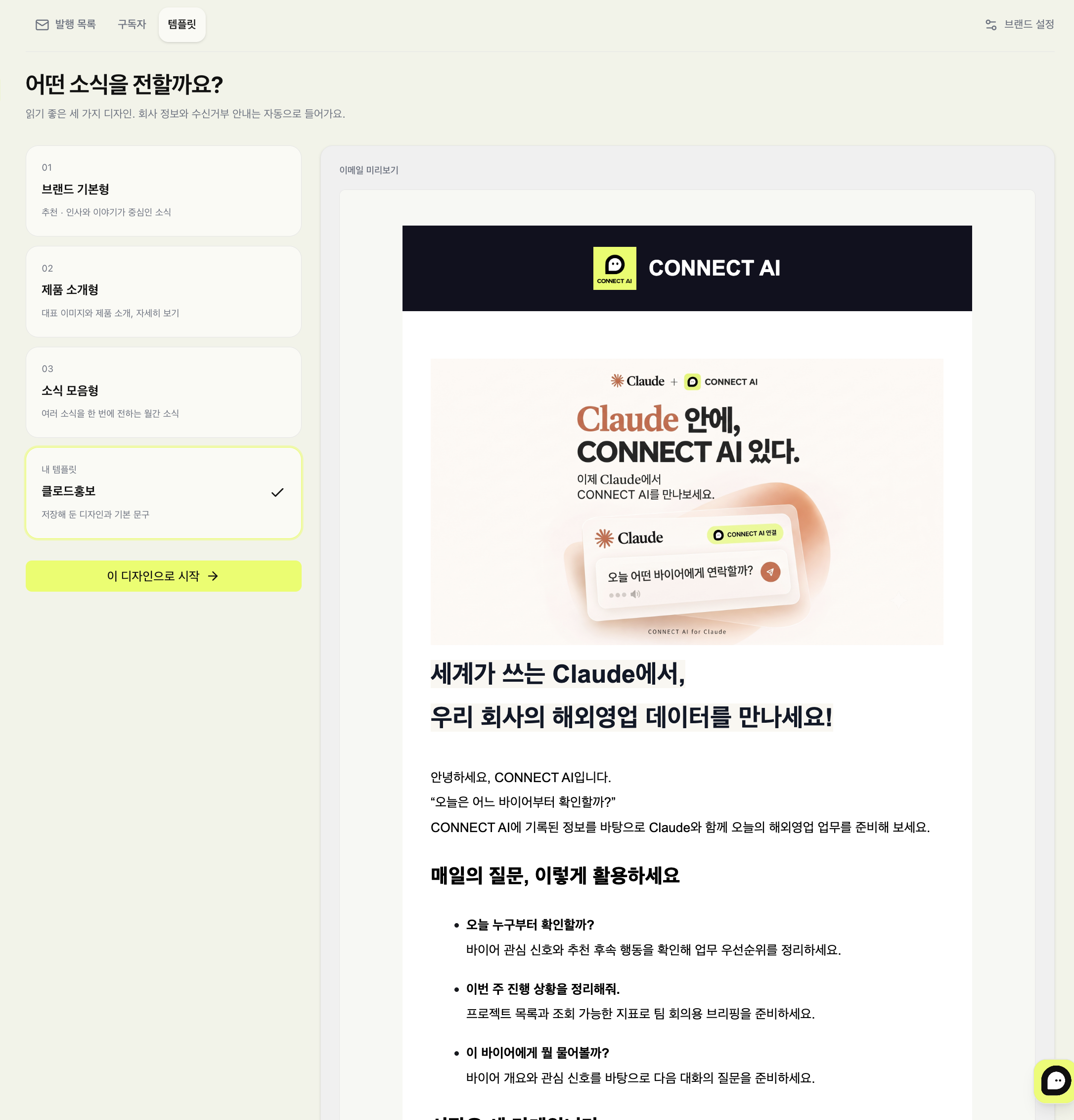
This is the “Claude Promo” newsletter featuring CONNECT AI news. Look through the actual template selection screen and email preview to see how to turn your own company news into a newsletter.
03

FROM FIRST ISSUE TO NEXT

Create your first newsletter like this.

Open Newsletters from the project menu to manage issues, subscribers and templates in one place. Select each step below to follow the process from writing to your next issue.

WITH PERMISSION

With the people who chose to hear from you,
keep the same promise.

Share your public signup form and people can subscribe without creating an account. You can start sending once they complete their subscription from the confirmation email.

04

BEFORE YOU START

Before you send.

Can I use my existing buyer contacts as subscribers right away?
Only use lists of people who have agreed to receive your newsletter. You can import an existing consented list as a CSV together with where and when consent was obtained, the notice shown and supporting records. Registering a business card or contact is separate from subscription consent.
Do I have to build the design from scratch?
You can start from three default designs: greeting and story, featured product and monthly digest. Apply the blocks you need along with your logo and colors, and save the result to My templates to use in future issues.
What do I need to prepare before sending?
Set your company name, company address and reply email, connect a Google or SMTP account, then select and save it as your sender account in Brand settings. You can send to up to 500 people at a time, and the credits required are shown after you choose your audience.
Can I test before sending?
Check the desktop and mobile previews, then send a test to the email address you are signed in with. Make sure images display and buttons link to the correct URLs. Fonts and spacing can vary by email app.
Can I cancel or edit a scheduled newsletter?
You can cancel a scheduled send until sending starts. Only the content and audience confirmed when you scheduled are sent, and subscribers who join after scheduling are included from the next issue. To change the content, cancel the schedule, then review and confirm again.
Can I see opens, clicks and replies after sending?
The send results show the processing status, the email you confirmed, and open, click and reply records for trackable sends. Open records may differ from actual reading, and reply counts require a supported sender account and mailbox sync. Earlier sends that were not tracked are not counted retroactively, and acceptance by the email provider does not mean the message reached the inbox.

YOUR NEXT CONVERSATION

Build awareness and visibility
with global buyers through your newsletter!

Tell your brand’s story and share it with buyers who chose to receive your news. It is a small first step toward your next meeting.

Create your first newsletter